
If you manage a commercial fleet, you may have asked (or been asked): “Are dash cams even legal?”
The short answer is yes. Dash cams are legal in all 50 U.S. states. No federal law prohibits recording video from a commercial vehicle, and courts have consistently upheld properly collected dash cam footage as admissible evidence. For fleet operators, that clarity is good news: it means you can move forward with a dash cam program knowing you are on solid legal ground.
But “legal” and “compliant” are not the same thing. Where you mount the camera, whether you record audio, how you handle driver-facing footage, and how you notify employees all involve specific rules that vary by state. Getting these details wrong can create liability instead of reducing it.
This guide walks through the key legal considerations every fleet operator should understand before rolling out dash cams, along with practical steps to keep your program on the right side of the law. If you are evaluating AI dash cams for your fleet, this is the compliance foundation you need first.
The Quick Answer: Yes, Dash Cams Are Legal Nationwide
There is no federal statute that bans dash cams in commercial vehicles. The Federal Motor Carrier Safety Administration (FMCSA) does not prohibit them, and the Department of Transportation (DOT) has not restricted their use. In fact, regulators and insurers alike have increasingly encouraged video-based safety programs as a tool to reduce accidents and improve driver accountability.
Every state permits dash cam use in vehicles, including commercial trucks, vans, and heavy equipment. The nuances are in the details: where the camera sits on the windshield, whether it records sound, and how the footage is stored, shared, and retained. Those are the areas where fleet operators need to pay attention. For a deeper look at how dash cams fit into a broader fleet safety strategy, IntelliShift breaks down the technology and its applications across fleet types.
Windshield Mounting Laws: Where Can You Place a Dash Cam?
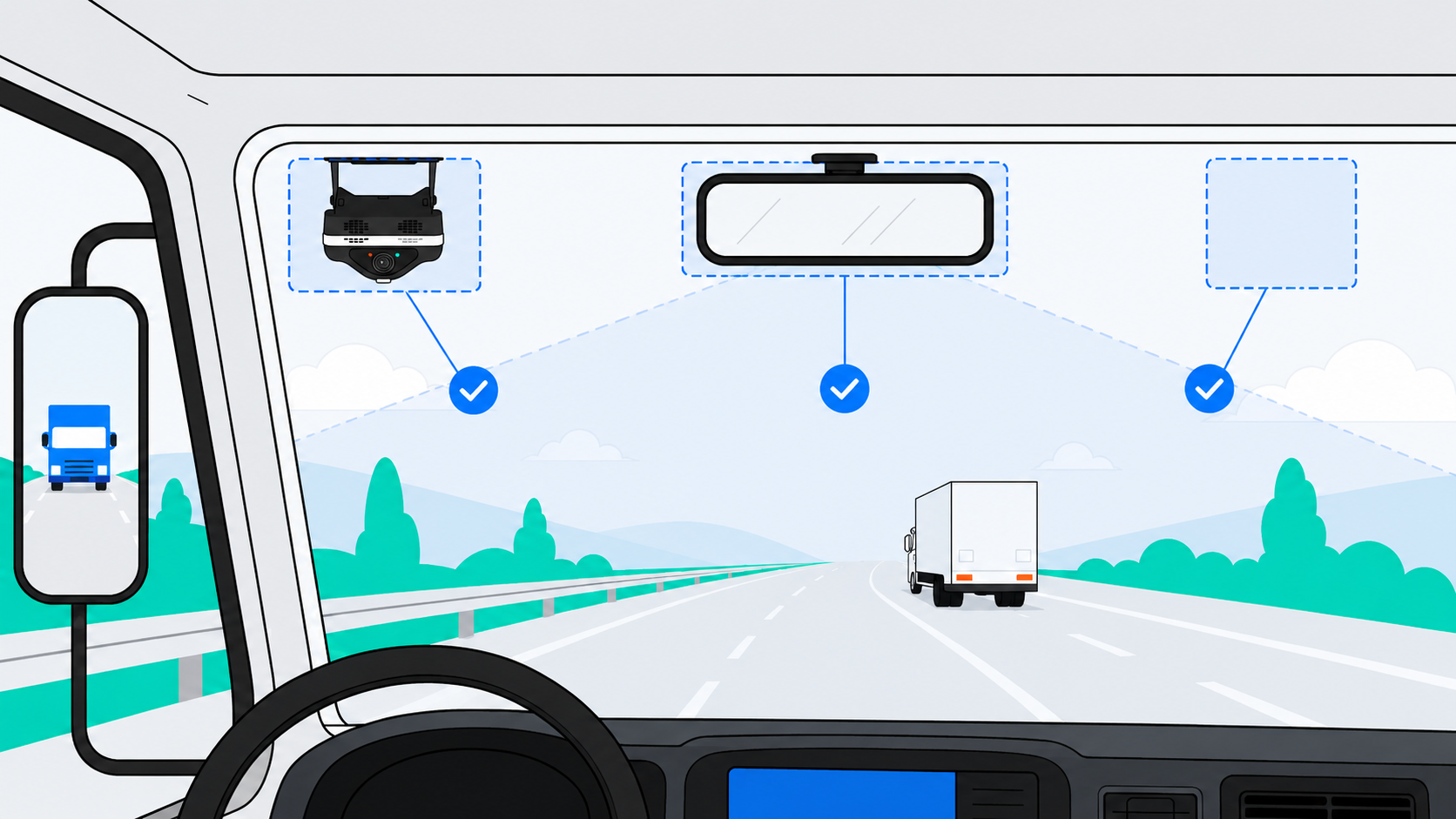
The single most common legal requirement across states is straightforward: your dash cam cannot obstruct the driver’s view of the road. Most states follow the general principle that windshield-mounted devices must be located so as not to interfere with the driver’s sightlines. The most reliably compliant placements across all 50 states are behind the rearview mirror, in a designated lower-corner zone (where state law specifies one), or on the dashboard.
A few states go further with specific dimensional rules. California, for example, defines dash cams as “video event recorders” under Vehicle Code 26708 and permits windshield mounting in three specific zones: a 7-inch square in the lower passenger-side corner, a 5-inch square in the lower driver-side corner (outside the airbag deployment zone), or a 5-inch square in the center uppermost portion of the windshield. Other states have their own variations on acceptable mounting zones. For fleet operators running vehicles across multiple states, the safest approach is to follow the most restrictive standard and mount cameras in a position that clearly avoids any part of the driver’s primary field of vision.
From a practical standpoint, most commercial-grade AI dash cam systems are designed with fleet compliance in mind. They use compact housings that fit cleanly behind the rearview mirror, staying well within legal boundaries in every state. When you work with a platform like IntelliShift, the installation team handles placement to meet both legal standards and optimal camera angle for AI detection accuracy.
Audio Recording Consent Laws: The Rule Fleet Operators Miss Most Often
This is where most fleet programs run into legal gray areas. Recording video from a dash cam is broadly permitted, but recording audio is governed by a completely different set of laws: state wiretapping and eavesdropping statutes. These laws were written long before dash cams existed, but they apply directly to any device that captures conversations inside a vehicle.
One-Party vs. All-Party Consent States
States fall into two categories when it comes to audio recording. In “one-party consent” states, only one person involved in the conversation needs to know the recording is happening. Since the fleet operator (as the employer) is a party to the arrangement, this is generally satisfied by having a clear company policy in place.
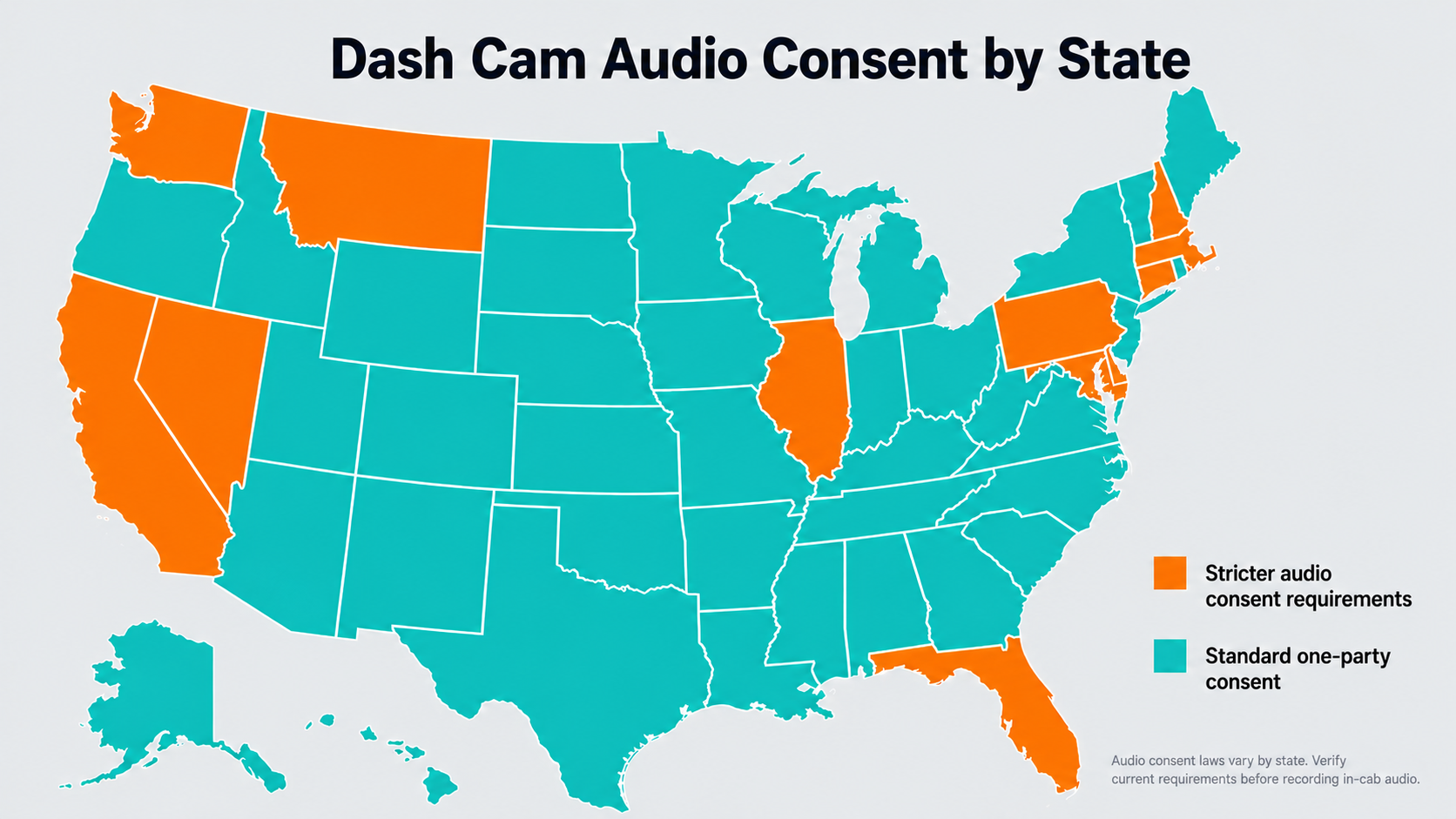
“All-party consent” states are more restrictive. In these states, every person whose voice could be captured must consent to the recording. The states commonly treated as all-party consent jurisdictions for audio recording are California, Connecticut, Delaware, Florida, Illinois, Maryland, Massachusetts, Montana, Nevada, New Hampshire, Pennsylvania, and Washington. Statutory scope and definitions of “private conversation” can vary, so confirm the rules for every state in your operating footprint with legal counsel.
Scope varies by statute (some apply only to phone calls, others to in-person conversations), so confirm the rules for every state your fleet operates in with legal counsel.
What This Means for Your Fleet
If your fleet operates in or passes through all-party consent states, you have a few options. You can disable audio recording on the dash cam entirely. You can post visible signage inside the cab notifying anyone entering the vehicle that audio and video recording is in progress. Or you can collect written consent from drivers as part of your onboarding or fleet policy documentation.
Most fleet operators find that a combination of written policy and in-cab signage is the simplest and most defensible approach. The key is documentation: if you ever need to use footage in a legal or insurance context, you want a clear record that all parties were aware of and consented to the recording.
Many AI dash cam platforms, including IntelliShift, allow fleet managers to configure whether audio recording is enabled or disabled on a per-vehicle or fleet-wide basis. That flexibility makes it easy to stay compliant across mixed-state operations. Learn more about how fleet telematics and dash cam systems integrate to support compliance at scale.
Driver-Facing Cameras and Employee Privacy: Addressing the Pushback
If there is one topic that generates more debate than legality, it is driver-facing cameras. Drivers understandably have questions about being monitored inside the cab, and fleet managers need to address those concerns directly, both legally and culturally.
The Legal Framework
From a legal standpoint, employers generally have the right to install monitoring devices, including cameras, in company-owned vehicles. Courts have consistently held that employees do not have a reasonable expectation of privacy in employer-owned commercial vehicles being used for work purposes. This principle applies in the vast majority of U.S. jurisdictions.
That said, best practice is not just about what you are legally allowed to do. It is about doing it in a way that protects both the company and its drivers. The strongest compliance position includes written fleet policy that clearly states dash cams (including driver-facing cameras) are installed in all company vehicles, explicit notification to all drivers before installation, a clear explanation of what footage is used for (safety coaching, exoneration, incident review) and what it is not used for (performance surveillance unrelated to safety), and documentation signed by each driver acknowledging the policy.

Turning a Legal Question into a Cultural Win
The fleet operators who get the most value from driver-facing cameras are the ones who frame them as a driver protection tool, not a surveillance tool. When a camera captures footage that exonerates a driver from a false claim, or when AI-powered coaching helps a driver correct a risky habit before it becomes an incident, the technology shifts from being something done to drivers to something done for them.
IntelliShift’s AI dash cam platform supports this approach through real-time, in-cab coaching that provides drivers with immediate, private feedback rather than deferring issues to an after-the-fact review. That distinction matters for driver buy-in. Explore how IntelliShift’s construction fleet solutions help fleet leaders build safety culture alongside compliance.
Dash Cam Footage and Legal Admissibility
One of the strongest business cases for dash cams is their role in legal protection. Properly obtained dash cam footage is admissible as evidence in U.S. courts and is routinely used by insurers, attorneys, and fleet operators in accident disputes, liability claims, and workers’ compensation cases.
What Makes Footage Admissible?
For dash cam footage to hold up in a legal proceeding, it generally needs to meet a few basic criteria: the footage must be authentic and unaltered, the recording must have been obtained lawfully (meaning the camera was legally mounted and any audio recording complied with consent laws), and the footage must be relevant to the matter at hand. Chain of custody matters as well. Footage that has been securely stored with clear access logs is far more defensible than clips pulled from a loose SD card.
Cloud-based AI dash cam platforms have an advantage here. Footage is automatically uploaded, time-stamped, GPS-tagged, and stored with tamper-proof integrity. When IntelliShift’s platform captures a safety event, the video is tied to the vehicle’s telematics data, including speed, location, and driver behavior context, creating a complete, defensible record.
Exoneration: The Underrated Benefit
Fleet operators often think of dash cam footage in terms of catching problems. But the more powerful use case is exoneration. When a third party files a fraudulent claim against your driver or a roadside incident gets misrepresented in a police report, having clear, time-stamped video evidence can save your company tens or hundreds of thousands of dollars in legal costs and settlements.
In the construction industry, where vehicles are regularly operating near active job sites, public roads, and pedestrian zones, the exposure to disputed claims is especially high. Dash cam footage provides an objective, unbiased account of every event.
Key State-by-State Considerations for Fleet Operators
Rather than memorizing 50 different sets of rules, fleet operators should focus on the three categories of state law that matter most for dash cam compliance.
| Legal Area | What to Know | Fleet Action |
|---|---|---|
| Windshield Mounting | Most states prohibit obstructing the driver's view. Several states (CA, AZ, UT, VT, and others) have specific size or zone rules. | Mount behind the rearview mirror or within a state-specific permitted zone. Follow the most restrictive state in your operating footprint. |
| Audio Recording | 12 states are commonly treated as all-party consent jurisdictions: CA, CT, DE, FL, IL, MD, MA, MT, NV, NH, PA, WA. Scope varies by statute. | Disable audio in all-party states, or collect written consent and post in-cab signage. |
| Driver-Facing Cameras | Legal in company-owned vehicles in most jurisdictions. Written notice to employees is strongly recommended. | Create a written dash cam policy, notify drivers before installation, and document signed acknowledgments. |
For fleets operating across state lines, the most practical strategy is to build your program around the strictest standards in your operating footprint and apply those rules uniformly. This simplifies compliance, reduces legal exposure, and avoids the operational headache of managing different configurations state by state.
A Note on Cross-Border Operations: Canada and Mexico
If your fleet operates across international borders, a few additional considerations apply. In Canada, dash cam use is legal but subject to provincial privacy laws, which generally require that individuals be informed they are being recorded. Canada’s Personal Information Protection and Electronic Documents Act (PIPEDA) and provincial equivalents tend to be more privacy-forward than U.S. federal law, so explicit driver notification and clear data handling policies are essential.
For fleets crossing into Mexico, the legal landscape is less standardized. Dash cam use is not prohibited, but enforcement and privacy frameworks vary by state. Fleet operators running cross-border routes should consult with legal counsel familiar with the specific jurisdictions involved.
Laws Change: Build a Program That Adapts
Dash cam law is not static. States regularly update their statutes around recording devices, privacy, and commercial vehicle technology. Recent activity has focused on biometric data, AI-driven driver monitoring, and in-cab privacy, so treat compliance as an ongoing process rather than a one-time checkbox.
The best approach is to build your dash cam program with flexibility from the start. Choose a platform that lets you toggle audio recording, configure camera settings by region, and update policies without ripping out hardware. Pair that with a regular legal review (at least annually, or whenever you expand into new states), and you will stay ahead of regulatory shifts.
Working with an AI dash cam partner like IntelliShift also means you have a vendor invested in compliance. Platform updates, configuration flexibility, and ongoing customer support help you adapt as the legal landscape evolves, without starting from scratch.

The Bottom Line: Legal Confidence Starts with the Right Foundation
Dash cams are legal, they are an accepted part of commercial fleet operations, and they are one of the most effective tools available for protecting your drivers, your vehicles, and your bottom line. The compliance piece is manageable as long as you approach it with the right policies, the right communication, and the right technology partner.
IntelliShift’s AI dash cam platform is built for fleet operators who need more than a camera on a windshield. With configurable audio settings, cloud-based footage storage, real-time AI-powered coaching, and integration with your broader fleet management ecosystem, IntelliShift helps you stay compliant, reduce risk, and build a safer fleet from day one.
Ready to see how it works? Explore IntelliShift’s AI dash cam solutions and take the next step toward a compliant, camera-ready fleet.